Creating Event Triggers
In the Vodafone Business Managed IoT Connectivity Platform, preconfigured triggers ensure an action – or event – happens when a predefined metric, such as voice duration or data usage, reaches a predefined threshold. These triggers are known as event triggers. They can be associated with different customer levels or entities, such as an individual SIM, an APN, or even an entire account hierarchy, allowing granular or aggregated control over how and when actions are executed.
You can create these triggers within the platform by following the steps below – as long as you have the required authorisation level.
How to create event triggers
From the menu on the left of the Vodafone Business Managed IoT Connectivity Platform Dashboard or home page, select Event Triggers.
This takes you to the Event Triggers page, where you can search for an event trigger using filters such as Organisation Name and Event Status.
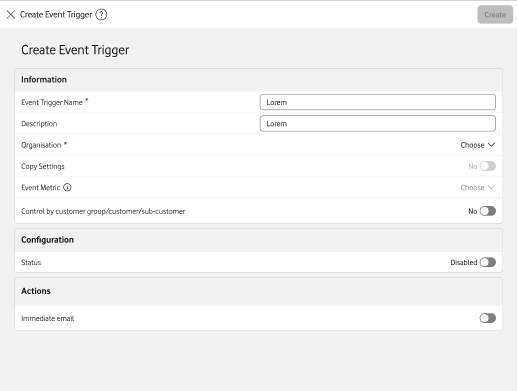
Click on Create. This will open the Create event trigger window.
Enter the details of the event trigger you want to create, including Information such as a name and organisation, the Configuration status, and whether you want an immediate email notification when it is hit.
You will then receive a message saying you have successfully created a new event trigger – or not.
Can't find what you're looking for?

Your IoT administrator
Talk to the IoT administrator in your company. They understand your system best.

