Our New SIM/Device Ordering Tool is Now Live!
About the New SIM/Device Ordering Tool
The new SIM/Device Ordering tool marks an important step in making our SIM and device order process digital. Instead of relying on manual Excel templates and email-based order handling, you can now place orders through a guided online form in the Vodafone Managed IoT Connectivity Platform.
By moving ordering into the digital portal, the process becomes simpler, more consistent and easier to manage from start to finish. The form includes standardised fields, built-in validation checks, and, where available, pre-populated customer, product and pricing information to help reduce incomplete or incorrect orders.
The new digital ordering experience helps you:
Reduce the need for rework and follow-up communications.
Improve visibility of your order progress and status.
Make it faster and more convenient for you to submit and manage your orders.
Access support FAQs and raise tickets directly through the platform.
The tool is initially available to the customer groups that have been notified as part of this rollout.
Getting Started
It’s easy to order a new SIM or device via the Vodafone Managed IoT Connectivity Platform.
However, as with other areas of the platform, you can only perform the actions for which you have the appropriate authorisation level.
To order a SIM/Device:
1. Log in to the Vodafone Managed IoT Connectivity Platform.
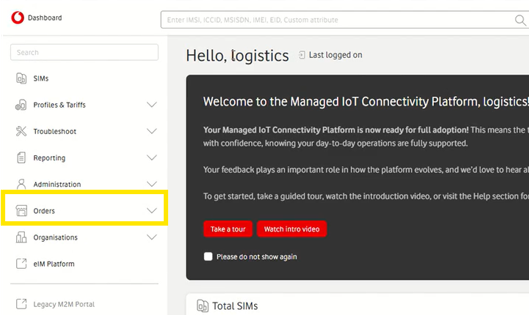
2. Select the Orders drop-down menu on the left-hand side of your dashboard.
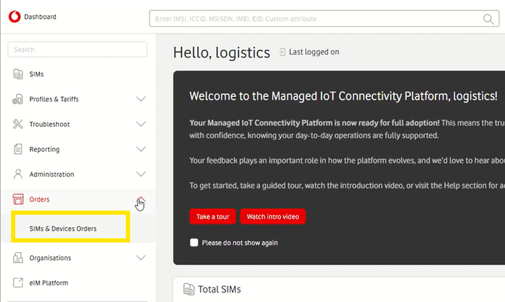
3. Click on SIMs & Devices Orders.
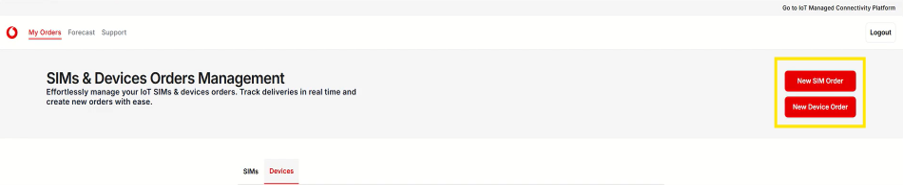
4. Once in the digital portal, select New SIM Order or New Device Order in the top-right corner.
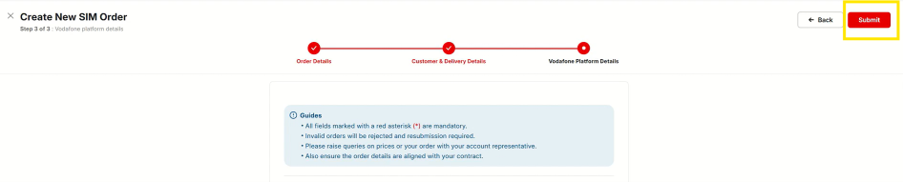
5. Complete the online form with the required information.
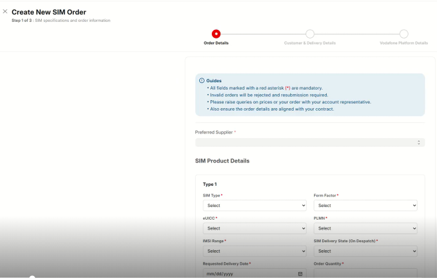
6. Review the information entered and correct any validation errors if displayed.
7. Submit the order for processing
If You Need Support
The SIM and device ordering tool has been designed to provide a simple and efficient ordering experience.
However, if you encounter any issues while using the tool, support is available through the self-service portal.
To find answers to common questions, select ‘Support’ from the top navigation menu and review the available FAQs.
If you are still unable to resolve your query, you can raise a support ticket directly through the portal and provide the required information. A member of the team will review your request and get back to you.
Can't find what you're looking for?

Your IoT administrator
Talk to the IoT administrator in your company. They understand your system best.