FAQs
New to the platform? Find the answers to your questions quickly and easily with our handy FAQ section.
Yes, you can search by and view IP address values for your SIMs within the Vodafone Business Managed IoT Connectivity Platform via both the SIM List and the SIM Details pages.
To view IP address values
Navigate to the SIM List by selecting SIMs from the lefthand menu on the Vodafone Business Managed IoT Connectivity Platform Dashboard.
Click on Filters then select IP address from the Manage Filters dropdown menu.
You can then search for several IP addresses simultaneously (by separating each entry with a comma – , – or by using the wildcard *).
To view the results for a specific SIM, simply click on More and you will be shown the Packet Data section of the SIM Details window.
You can also view the IP address(es) linked to a SIM by clicking on the relevant SIM in the SIM List to open the SIM Details window and scrolling down to Packet Data.
Yes, the reports generated will be visible in both portals regardless of the portal used to generate them.
You can unblock a blocked user by following the steps in this linked section of the Vodafone Business Managed IoT Connectivity Platform help content.
Multiple roles are now available in the Vodafone Business Managed IoT Connectivity Platform - and those with multiple roles can switch between them using the Role Selector.
Yes, the Vodafone Business Managed IoT Connectivity Platform is currently available in English, German, Spanish, French, Portuguese, Italian, Korean, Ukrainian, and Chinese.
If you are a Vodafone customer, please contact the Customer Admin in your organisation and ask them to create a user account for you. This functionality will be available on the Vodafone Business Managed IoT Connectivity Platform soon; until then please use the M2M Portal to create new users.
If you are a Vodafone user, you can apply for access to the Vodafone Business Managed IoT Connectivity Platform via the Vodafone IT User Access Management service. Your access to the platform wil then be governed by your user role.
You cannot change your registered username or email address, but you can change details such as you phone number by clicking on your initials in the top right corner of the Dashboard and choosing Settings.
Alternatively, simply type "Change my..." and the aspect of your account you want to change into the Global Search bar at the top of the page.
To change user roles, you will need to contact the Customer Admin within your organisation or - if you are an existing Vodafone user - via the Vodafone IT User Access Management process.
However, if you already have multiple roles, you can switch between them using the Role Selector.
You can contact the Vodafone support team via all the usual channels. To facilitate the process, please remember to include the platform URL - https://iotportal.vodafone.com - in your message.
When users change or update their devices, they will need to install the Microsoft Authenticator app on the new device and reset their portal Authenticator method by following the steps below.
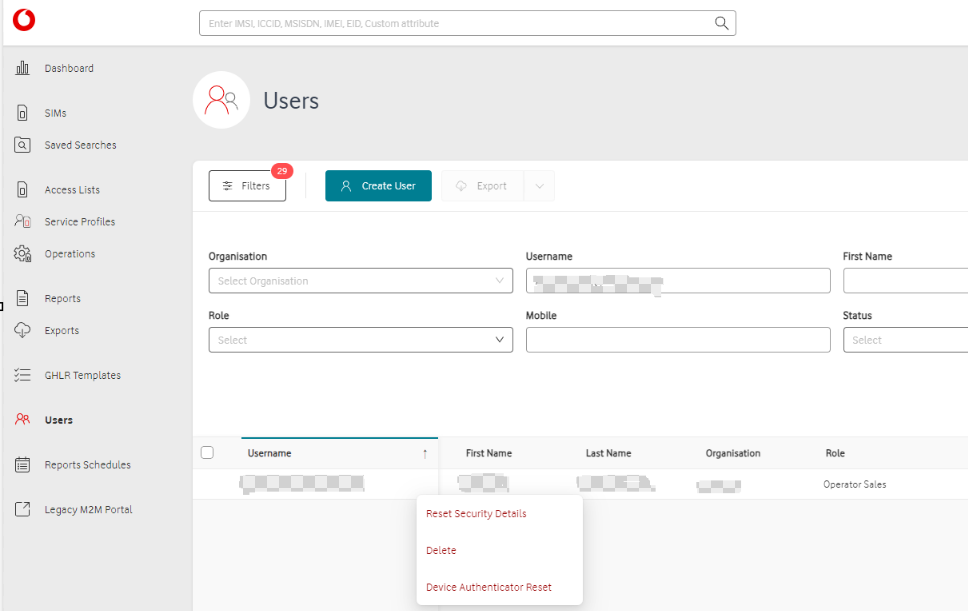
Users with the appropriate authorisation can reset their – or another user’s – Authenticator method in two different ways:
1. Navigate to the Users page, look up the relevant user’s account, click on the three dots icon - … - and then select Device Authentication Reset.
2. Navigate to the User Settings page (accessed by clicking on the initials in the top corner of the Dashboard for your own account or via the Users page for someone else’s).
To perform the reset, you then need to go to Security, scroll down to Manage Device Authenticator and select Reset:
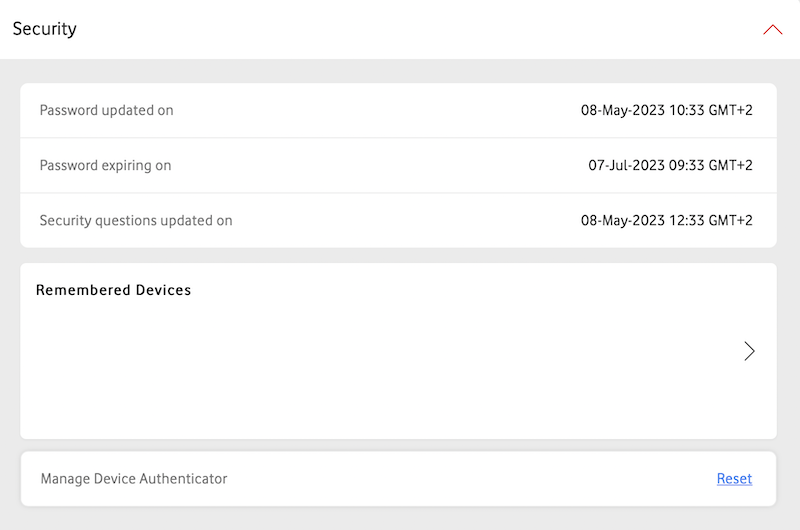
This will trigger a pop-up window asking you to confirm you want to proceed with this action.
Exported files are available in the system for 14 days.
Any reports generated are available in the system for 30 days.
For security reasons, your password will expire after 90 days.
The M2M Portal will be available until all existing features have been migrated to the Vodafone Business Managed IoT Connectivity Platform . Until then, both platforms will display the latest information on your account (with maximum delays of a few minutes).
There is no size limit for SIM exports in the Vodafone Business Managed IoT Connectivity Platform . In the M2M Portal, exports are limited to 1,000 SIMs.
You will receive notifications from the IoT Global Support or IoT OPS teams.
Zero rated data uploads and downloads are unbilled actions.
To keep your account secure, your password must meet all of the following criteria:
• At least 8 characters long
• Include at least one uppercase letter (A–Z)
• Include at least one number (0–9)
• Include at least one special character (for example: ! @ # $ %)
• Must not contain:
Your username
Your first name
Your last name
• Must be different from your previous three passwords
You can see a list of the available functionalities and features offered by the Vodafone Business Managed IoT Connectivity Platform by visiting the Live Features section.
One Charge is a managed connectivity offering with a one-off upfront charge per SIM, including a predefined data/SMS allowance and a specified time period for usage.
The portal user will be able to view the Service Profile assigned to each One Charge offering, and, in the SIM Details section, a widget to track real time allowance and view threshold information per SIM.
There is no size limit on the files or reports you can export from the Vodafone Business Managed IoT Connectivity Platform . However, your ability to export files may be affected by other factors, such as your browser settings.
The recommended browser is the latest version of Google Chrome.
You are no longer able to access M2M User management as Vodafone has decided to remove this functionality. All User Management actions are available into the Vodafone Business Managed IoT Connectivity Platform for a better experience.
Why is this change happening now?
The decommissioning is part of a broader migration strategy to enhance your experience with a single touchpoint.
How do I find the user management in the Vodafone Business Managed IoT Connectivity Platform ?
All Users trying to access user management in M2M will see a tooltip message and be redirected to the Vodafone Business Managed IoT Connectivity Platform’s “Users” section or Help page. All other M2M functionalities will remain available for now.
I’m a user who has primary and secondary roles. Will I still be able to perform user management actions in M2M?
Yes, users with secondary roles can still perform user management actions in M2M for now, but only if you are actively using the secondary role when accessing M2M.
How can I ask for support?
If you need any support, please ask your IoT Solution Architect and Sales representatives.
Yes, the two portals will synchronise with minimal delays (of up to a few minutes).
Can't find what you're looking for?

Your IoT administrator
Talk to the IoT administrator in your company. They understand your system best.

