Portal Interactions
You can monitor actions performed within the platform by navigating to the Portal Interactions section. This area provides visibility into key activities carried out by users.
Currently available actions
At this stage, the Portal Interactions section displays actions related to the following functionalities:
User Management – actions such as creating, editing, or removing users.
CSP Management – changes or updates to Communication Service Provider settings.
APN Management – configuration or modification of Access Point Names.
API Users – create and edit API users.
Devices – actions including change CSP, set IMEI, send SMS…
Report Templates – create, edit, or delete report templates.
Schedules – create, edit, or delete schedules.
Voice Access Lists – create, edit, or delete access lists.
Event Triggers/ High/Rogue Events – edit event triggers and high/rouge event fields.
Serving Networks – create and edit relevant information related to serving networks.
Customer – edit or delete customers.
Customer Group – actions such as editing and deleting customer groups.
Event Triggers – create and delete event triggers.
Devices – send commands to your devices.
P2P SMS access lists – editing, deleting, and creating P2P SMS access lists
Automated Customers – create and edit automated customers.
As elsewhere on the platform, what you can see is governed by your user profile authorisation level.
If you have the required authorisation level, you can also export information on portal interactions to share outside the platform.
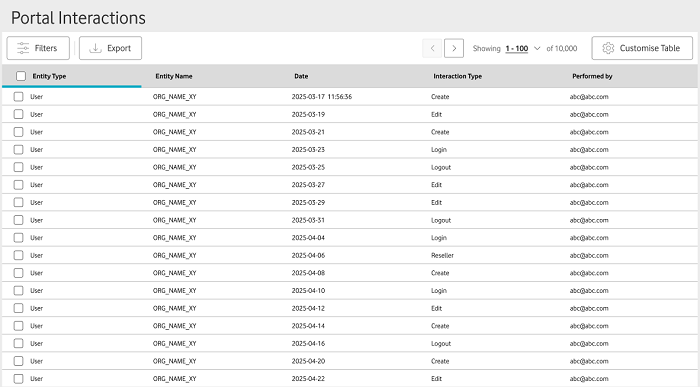
To view portal interactions
From the menu to the left of the home page, select Reporting then choose Portal Interactions from the dropdown menu that appears.
On the Portal Interactions page, use the filters to locate the type of actions or action you want to check. The filters you can use to do this are: Performed by, Entity type, Entity Type Name, Period, Interaction type, and Details.
If required, you can also modify the details included in the table by clicking on Customise Table.
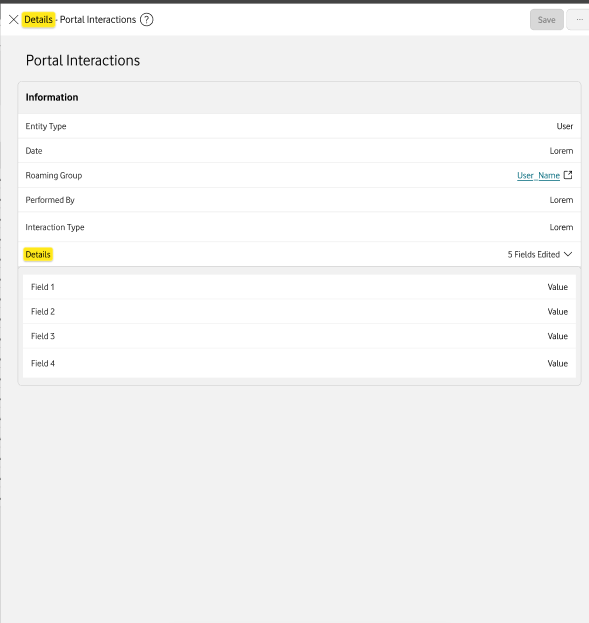
Select a portal interaction to open the Details window, where you can view information such as Entity type, Date, Roaming group, Performed by, and Interaction type.
Can't find what you're looking for?

Your IoT administrator
Talk to the IoT administrator in your company. They understand your system best.

