API users
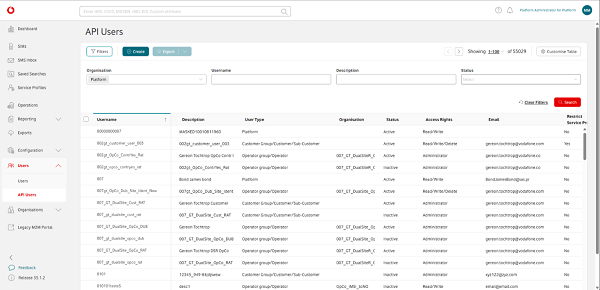
You can view a list of the API users linked to your Vodafone Business Managed IoT Connectivity Platform role quickly and easily via the API Users page – as long as you have the required authorisation level. On this page, you can also export the list, search for the API user or users you require using filters such as Status or Username, and view their details. If you have the necessary permissions, you can also create a new API user and/or edit the details of an existing API user.
To view API users
To access a list of the API users linked to your platform role from the Vodafone Business Managed IoT Connectivity Platform home page, simply hover over Users in the menu on the left of the page, then click on API Usersin the dropdown menu that appears.
You can then view the details of the API users listed, search for the information you need using the filters – Username, Description, and Status – or create a new API user to add to the list.
Once you have customised the list to your requirements, you can also export this information by selecting Export to open the Export window and using the filters to choose the file format and content of your export.
Contents
Can't find what you're looking for?

Your IoT administrator
Talk to the IoT administrator in your company. They understand your system best.

