Event Triggers
In the Vodafone Business Managed IoT Connectivity Platform, you can set up an action - or an event - to take place automatically in the event of a predefined threshold, such as a data usage threshold, being reached. This is known as an event trigger.
Event triggers are preconfigured and linked to the relevant Service Profile. However, you can view and export a list of them within the platform.
If you have the necessary authorisation level, you can also view detailed information about each event trigger and edit these details when required.
Contents
To view a list of event triggers
From the menu on the left of the Vodafone Business Managed IoT Connectivity Platform Dashboard or home page, select Event Triggers.
This takes you to the Event Triggers page, where you can search for an event trigger using filters such as Organisation Name and Event Status.
Once you have found the event trigger you need, simply click on it to open the Details window, where you can view and edit its details – as long as you are authorised to do so. These details are split into three sections: Information, Configuration, and Actions.
If, on the other hand, you want to export the list, select Export in the top left corner.
High/rogue usage event triggers
If you have the necessary authorisation level, you can also manage the Information and Configuration details of high/rogue event triggers via the Event Triggers page. The users concerned will receive notifications if such action is required.
To manage high/rogue usage event triggers
From the menu on the left of the Vodafone Business Managed IoT Connectivity Platform Dashboard or home page, select Event Triggers. This takes you to the Event Triggers page.
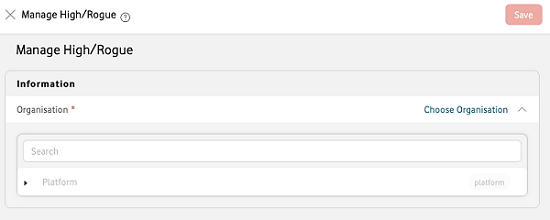
Click on Manage High/Rogue on the Event Triggers page. This will open the Manage High/Rogue event triggers window.
Select the relevant Organisation. You will then be able to select the Service Profile concerned from a dropdown list.
Once you have selected a Service Profile, you will see a Configuration section showing a group of pre-defined event triggers that can be configured by default Profile to manage High/Rogue Data, Voice, and SMS usage in the Service Profile selected.
You can then edit the Threshold, Monitoring Period, and Action for the different types of usage shown.
Can't find what you're looking for?

Your IoT administrator
Talk to the IoT administrator in your company. They understand your system best.

